PAW Patrol Academy
- 3.5
- Rating
- 10.00M
- Installs
- Free
- Price
 Analysis by App-foxy
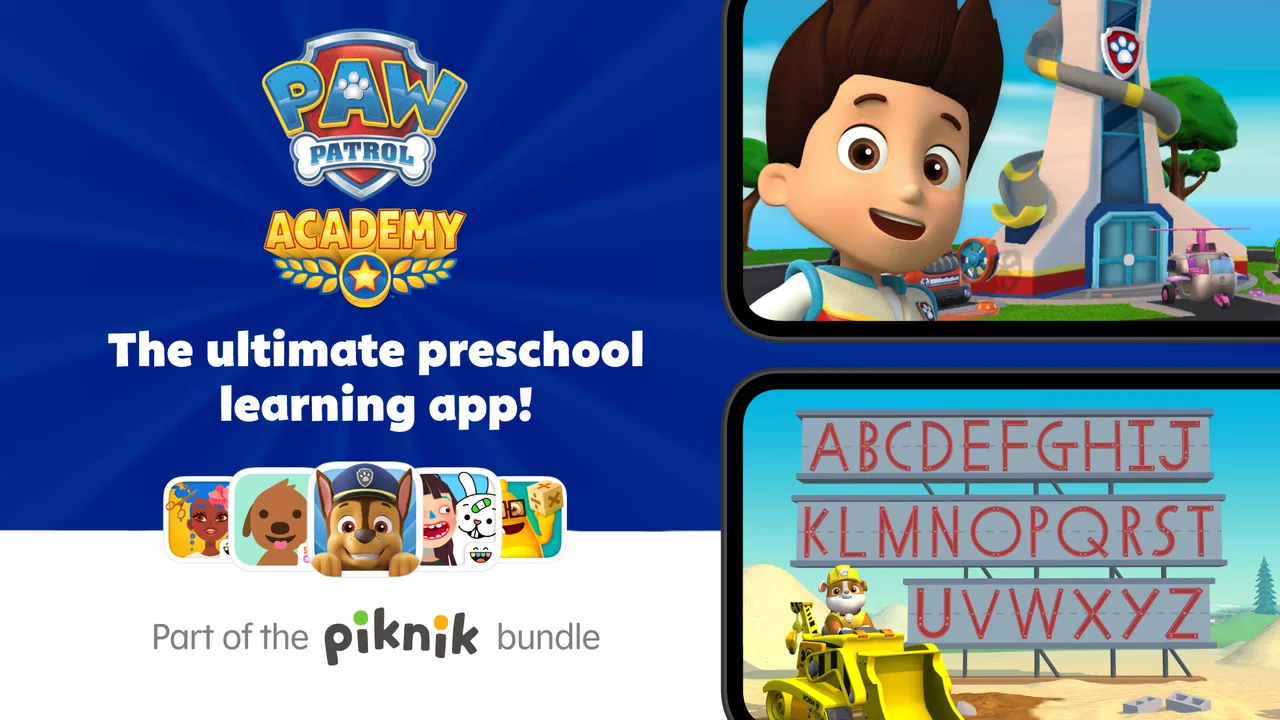
I spent time with PAW Patrol Academy as a parent-facing learning app for young children, and my first impression was clear: it is built to make short educational sessions feel like play rather than a lesson. The PAW Patrol setting gives children an immediate reason to explore, while the activities are aimed at early learners rather than older children looking for difficult challenges. I would place it firmly in the educational app category, especially for families with children between two and five.
The app comes from Play Piknik and is free to start. It is rated for Everyone, which fits the gentle, child-friendly presentation. Its store summary describes it as safe, fun, and ad free, and that combination matters when a child is using a phone or tablet with limited supervision. Still, I would not treat any children's app as a substitute for an adult nearby. The strongest results came when I used it as a shared activity, not as an electronic babysitter.
How I used it in a normal family routine
My most useful baseline workflow was to keep sessions short and predictable. Instead of handing over the device whenever my child was bored, I opened the app at a planned moment, chose one activity, and stayed close enough to ask questions. That simple routine made the experience more purposeful. The child was still enjoying the characters, but I could connect what appeared on screen with ordinary learning: naming colors, recognizing shapes, following instructions, and talking through choices.
You May Also Like

 Blood Strike: 2.5 Anniversary
Blood Strike’s Loadouts Turn Every Drop Into a Tactical Gamble
A close look at Blood Strike’s custom loadouts: how fast access to signature weapons reshapes its battle royale rhythm, rewards preparation, and narrows the gap between fights.

 Pandora - Music & Podcasts
Pandora’s Music Is Easy to Start, but Harder to Recover
Pandora’s strength is its low-effort path from a seed to a station. Its weak spot is how much confidence it asks you to place in connection, setup, and quiet recovery.

 8 Ball Pool
 Is Built on Rivalries, Rematches, and Routine
A close look at the rivalries, rematches, shared routines, and unanswered safety questions that turn a quick pool match into a persistent mobile community.

 Samsung Music
’s Quiet Strength Is Playing What You Already Own
Its reach comes less from spectacle than from dependable access to a personal library. That simplicity is both the app’s strongest retention engine and its ceiling.

 AccuWeather: Weather Radar
AccuWeather Review: A Quick, Clear Forecast for Everyday Decisions
For everyday plans, the best forecast is the one you can understand quickly. AccuWeather makes rain timing, radar, and local conditions easy to act on, with a few trade-offs.

 Hill Climb Racing
Why Hill Climb Racing Still Turns Crashes Into One More Run
A tiny car, a bumpy hill and one more upgrade: Hill Climb Racing keeps resurfacing because its simple chaos makes every near-miss feel personal.
More From Our News Desk



This approach also helped avoid the common problem with preschool apps: endless tapping without much thought. When a child rushes through a familiar activity, I pause and ask why a particular answer fits. With PAW Patrol Academy, the recognizable characters make those conversations easier because the child already has an emotional connection to the world. I found that the app worked best as a prompt for discussion rather than as a test that had to be completed perfectly.
A realistic use case is a quiet ten-minute period before dinner. I would let my child complete a small portion of an activity, then put the device away and continue the topic away from the screen. If the app involved identifying something, I might ask the same kind of question using objects in the room. That repeatable habit gave the digital activity more value than simply moving from one colorful screen to the next.
Parents should also decide in advance whether the child is allowed to explore independently. For a two-year-old, I would expect more assistance with tapping, waiting, and understanding instructions. A child closer to five may be able to navigate more comfortably, but that does not mean every activity will hold attention for the same length of time. The age range is broad, so the experience can feel very different depending on language development, concentration, and familiarity with touchscreens.
Settings and preparation that make sessions smoother
Before giving the device to a child, I recommend checking the app alongside the phone or tablet’s own controls. I would look at sound levels, screen brightness, automatic locking, and whether the device is likely to display unrelated notifications. These are not glamorous adjustments, but they prevent interruptions and keep the session focused. The app’s ad-free positioning is helpful, yet the wider device environment can still distract a young user.
The most important preparation is deciding how in-app purchases will be handled. The app is free, but optional purchases range from $4.99 to $79.99 per item. That is a significant difference between the entry experience and the possible cost of additional content. I would make sure purchase authentication is enabled on the device and explain to older preschoolers that buttons leading to a payment screen are for an adult. A child should never be expected to understand the financial meaning of a brightly presented option.
I also found it useful to choose the physical setup carefully. A tablet placed flat on a table encourages two-handed exploration and makes it easier for an adult to sit beside the child. A phone is more portable, but its smaller display can make shared viewing less comfortable. If the child is practicing fine motor control, a stable surface is preferable to holding the device while walking around.
Another worthwhile habit is to test the app when the child is not waiting impatiently. Open it, check that the audio is comfortable, and see how the opening flow feels on your device. The current version is 3.7, and the minimum operating system is Android 9, so compatibility is worth checking before planning a trip or a long waiting-room session. I would not rely on a newly installed app as an emergency distraction without trying it first.
For families using shared devices, I would create a clear handoff routine. Put the device in the same place, use the same volume level, and finish by returning to the home screen rather than leaving the child to wander through unrelated apps. This is especially useful when several adults supervise the child. Consistent handling reduces accidental purchases and makes it easier for everyone to know when the activity is over.
Faster patterns for parents who use it regularly
Once I understood the basic rhythm, I stopped treating every session as a full play period. A better pattern was to use the app for a specific purpose: a brief transition, a calm activity after a busy outing, or a way to reinforce a concept introduced elsewhere. This kept the app from becoming background noise. It also made the child more willing to stop because the session had a recognizable beginning and end.
One effective technique was the “watch, answer, explain” pattern. First, I let the child observe the activity without immediately helping. Next, I asked for an answer or action. Finally, I asked the child to explain the choice in simple words. For a preschooler, the explanation may be short or incomplete, but that extra step turns passive tapping into language practice. It is a small change, yet it is more valuable than focusing only on whether the screen marked an answer correct.
I would also alternate between independent attempts and shared attempts. On the first try, the child gets room to explore. On the second, I sit closer and talk through the decision. This is particularly useful when the child is frustrated. Rather than taking over the device, I can point, name the relevant detail, and let the child complete the action. That preserves a sense of ownership while still providing support.
Another practical shortcut is to end after a successful moment instead of waiting for boredom or irritation. If the child completes an activity with confidence, that can be a better stopping point than continuing until attention collapses. Preschool learning benefits from positive repetition, not necessarily long sessions. I would rather return later with the child still interested than push through several activities and create resistance.
The PAW Patrol theme is especially useful for reluctant learners who respond to familiar characters. I would use that interest as an entry point, then slowly shift the conversation toward the skill itself. For example, the child may begin by talking about a favorite character and end up practicing recognition or following directions. The character appeal is not the whole educational value, but it can make the first step easier.
At the same time, parents should watch for guessing behavior. A child may tap quickly until something works, particularly when an activity is familiar. When that happens, I slow the pace by asking the child to point out the clue before tapping. If the app does not offer enough challenge for a child who already understands the material, I would use it for review rather than expecting it to teach the next level of a skill.
What it does better than ordinary alternatives
Compared with handing a preschooler a general video app, PAW Patrol Academy gives the screen time a clearer educational purpose. A video may hold attention, but it usually offers fewer opportunities for the child to make a choice, respond, and try again. Here, the familiar franchise provides motivation while the activity format encourages participation. That makes it a better fit when I want the child to do something rather than simply watch.
Compared with a workbook, the app is more forgiving for children who are not yet comfortable holding a pencil. Touch interaction can feel accessible, and the characters provide immediate context. The trade-off is that touchscreen interaction does not replace handwriting, drawing, cutting, or manipulating physical objects. I would use the app alongside hands-on activities, not instead of them.
Compared with a broad early-learning platform, this app is more focused in tone and audience. That can be an advantage for a child who is strongly interested in PAW Patrol and becomes overwhelmed by a large collection of unrelated subjects. The limitation is that a child who wants a wider curriculum may outgrow the focused theme or look for more variety. Families seeking structured progress across many areas may prefer a broader educational service.
The ad-free positioning is another practical advantage for a young audience. Unexpected advertising can interrupt concentration or expose children to unsuitable prompts. Removing that particular distraction makes shared use more comfortable. However, the presence of in-app purchases means “free” should be understood as a starting point, not a guarantee that every available element is included without cost.
Where experienced use still meets limits
The biggest limitation is the narrow developmental window. Children from two to five do not have identical needs, and one app cannot provide the right level of difficulty for all of them. A younger child may need help with navigation, while an older preschooler may find repeated activities too easy. I would judge the app by whether it supports the particular child in front of me, not by the age label alone.
The character theme can also be a weakness for children who are not interested in PAW Patrol. Familiarity is a strength only when it actually motivates the child. If the characters do not appeal to your family, the app may feel less engaging than a neutral learning tool with stronger progression or a subject your child already enjoys.
I would also be cautious about using it during meals, in the car, or whenever the goal is simply to keep a child quiet. Those situations can make the app convenient, but they do not necessarily create good learning conditions. A child who is tired, hungry, or overstimulated may tap through activities without absorbing much. The app is more effective when the child has enough attention to respond and talk.
Families should think about purchase boundaries before a child explores deeply. The broad range of optional item prices means a parent needs to know what is included in the free starting experience and what requires a decision. I would make purchases only after observing whether the child returns to the available activities willingly. Paying for more content is difficult to justify if the basic routine has not become useful.
There is also a difference between an app that supports learning and one that measures learning. I would not use this as the only way to judge whether a child understands a concept. A successful tap may reflect recognition, guessing, or help from an adult. The best assessment is what the child can do away from the screen: identify something in the room, explain a choice, or repeat a skill in a new situation.
Who should choose it and who should look elsewhere
I would recommend it to parents of preschoolers who already enjoy PAW Patrol and need a simple, low-friction way to add purposeful screen time to the day. It is also a reasonable choice for adults who want to sit with a child and turn short activities into conversation. The free starting point makes it easy to test the fit before considering optional purchases.
I would be less enthusiastic for families looking for advanced academic progression, detailed parent reporting, or a complete replacement for physical learning materials. Children who prefer open-ended creativity, construction, drawing, or outdoor play may not find enough variety here. In those cases, a workbook, craft activity, library book, or broader learning platform may be a better primary choice.
The app has reached over ten million installs and holds an average rating of 3.5 from around 9.3 thousand ratings, so it clearly has a substantial audience while also leaving room for mixed experiences. I read that combination as a reason to try it personally rather than assuming the franchise guarantees a perfect fit. The child’s response, the device setup, and the family’s boundaries matter more than popularity alone.
It was released on September 27, 2023, and the current version is 3.7. Those details make the app easy to identify when checking compatibility or comparing it with other options. Its age rating of Everyone supports its preschool focus, but adult guidance remains important because age suitability and educational suitability are not exactly the same thing.
My verdict after building a repeatable routine
PAW Patrol Academy works best when I treat it as a short, guided learning tool wrapped in a familiar character world. Its strongest qualities are approachability, a child-friendly presentation, and the ability to turn a favorite franchise into an opportunity for simple participation. The ad-free positioning is reassuring, and the free entry point lowers the risk of trying it with a child who already likes the theme.
My advice is to prepare the device first, secure purchase controls, keep sessions brief, and ask the child to explain choices rather than only tapping answers. Those habits reveal whether the app is genuinely helping. They also prevent the common mistake of judging educational value by how long a child stays on the screen.
I would not call it a complete early-learning system, and I would not buy optional content automatically. For the right child, though, it can become a useful part of a balanced routine: a few minutes of interactive practice followed by conversation, physical play, reading, or a real-world version of the same idea. If your child is within the intended age range and already responds to PAW Patrol, I think the free version is worth trying. If your priority is deep curriculum coverage or measurable long-term progression, I would choose a broader alternative and keep this as a themed supplementary activity.
FAQs for PAW Patrol Academy
01What is PAW Patrol Academy and what age group is it suitable for?
PAW Patrol Academy is an educational app designed to engage children with fun and interactive learning experiences. It features a range of activities that develop skills such as problem-solving and creativity, all presented through beloved characters from the PAW Patrol series. The app is primarily suitable for children aged 3 to 7 years.
02What types of activities are included in PAW Patrol Academy?
The app includes a variety of activities such as puzzles, memory games, and creative tasks that encourage learning and development. Each activity is designed to enhance skills like critical thinking, coordination, and color recognition, all while being guided by the PAW Patrol characters your child loves.
03Is PAW Patrol Academy available on both Android and iOS devices?
Yes, PAW Patrol Academy is available for both Android and iOS devices. You can download it from the Google Play Store for Android devices and the Apple App Store for iOS devices. This ensures that a wide range of users can access the app regardless of their preferred platform.
04Are there any in-app purchases or ads in PAW Patrol Academy?
PAW Patrol Academy may feature in-app purchases that allow users to unlock additional content or features. Parents should be aware of these options to manage spending. The app is designed to be child-friendly, so advertisements, if present, are minimal and age-appropriate, ensuring a safe experience for kids.
05How does PAW Patrol Academy ensure a safe environment for children?
PAW Patrol Academy prioritizes safety by adhering to strict guidelines for children's apps. It includes parental controls and requires parental consent for in-app purchases. The content is curated to be appropriate for young children, ensuring a secure and educational experience without exposure to harmful material.
Pros
- Engaging educational content for kids
- Colorful and interactive graphics
- User-friendly interface
- Regular updates with new missions
- Safe environment with no ads
Cons
- Limited free content available
- Requires internet for full features
- In-app purchases can add up
- May not appeal to older kids
- Some levels may be repetitive

PAW Patrol Academy
Gallery